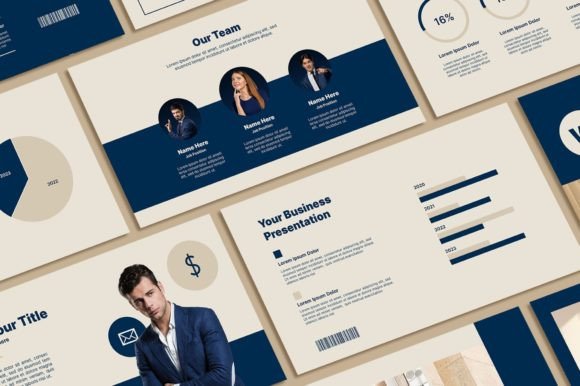
Minimal Blue Powerpoint Template: A Modern Design Asset
The Essence of a Clean, Futuristic Presentation
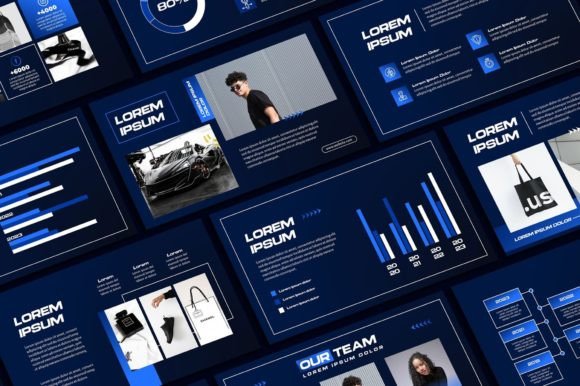
Welcome to Sky Creation! Enhancing your presentation design to feel more professional and modern starts with the right foundation. The Minimal Blue Powerpoint Template is a specific design asset built for clarity and impact. Its visual personality is defined by a cool, sophisticated blue palette, ample white space, and sleek, futuristic layouts. This isn't just a collection of slides; it's a coherent system designed to project confidence and forward-thinking appeal. The style avoids clutter, focusing on clean lines, geometric shapes, and a limited color scheme that ensures your content remains the star. For anyone creating a pitch deck, a corporate report, or a creative portfolio, this template offers a ready-made aesthetic that feels both current and professional.
Practical Applications Across Industries
Where does a template like this truly shine? Its strength lies in its versatility within professional and creative contexts. Consider a startup founder preparing a pitch for investors; the clean, modern typography and structured layouts can help convey a sense of organized innovation. A marketing manager building a quarterly review for stakeholders will find the consistent visual hierarchy makes complex data easier to digest. Even educators or bloggers creating workshop materials can leverage the minimalist design to keep audiences focused on the message. The template works exceptionally well for projects where brand perception is key—think tech companies, design agencies, financial services, or any business wanting to communicate stability and modernity through its brand identity.
The included assets are practical. With 62 unique slides, you have a framework for every part of your narrative, from title sequences to data visualization and team introductions. The 400+ free icons are a significant bonus, allowing you to visually reinforce concepts without hunting for external resources. The 16:9 aspect ratio is now standard for most displays, ensuring your presentation looks native on modern screens. Because all graphics are resizable and editable, you aren't locked into a single look. You can adjust the scale of an icon or shift the position of a shape to better suit your specific content, which is crucial for maintaining a custom feel.
Integrating the Template into Your Workflow
Adopting any new design asset requires a smooth process. Sky Creation has outlined a clear path: purchase, download, install fonts, and edit. The requirement for Microsoft PowerPoint or Excel is standard, but it's worth noting that compatibility with other software like Google Slides or Keynote may require conversion and could affect formatting. A comfortable workspace and a PC or laptop are the only other tools needed. The real work begins in the editing phase. You can change text and colors, swap photos, and add your logo, but the most effective approach is to use this as a starting point. Don't just plug in your old content; rethink your slides to match the template's logic. Use the clean layouts to break down your ideas into clearer, more digestible points. Test how your brand colors interact with the preset blue—sometimes a slight adjustment to a lighter or darker shade creates better harmony.
Understanding the terms of use is essential for commercial projects. The designs are copyrighted to Sky Creation and are licensed for personal use. This means you can use them for your own business presentations, internal meetings, or personal portfolios. However, you cannot resell the template itself or redistribute the file. If you're a designer creating presentations for clients, you would need to ensure the final deliverable is a finished product (like a PDF or video) and not the editable template file. Always clarify licensing when using any premium font or design asset in client work to avoid complications.
Making the Most of Your Design System
When you open the Minimal Blue Powerpoint Template, resist the urge to immediately change everything. First, study the included layouts. Notice how the designer used alignment, spacing, and placeholder sizes to create rhythm. This is a lesson in modern typography and visual hierarchy. Use the consistent styles to build recognition within your own presentation—your audience will subconsciously appreciate the coherence. For longer decks, consider creating a simple style guide note for yourself: list the exact hex codes for the blues you're using, note the primary and secondary font choices from the installed files, and decide on a consistent icon style. This ensures brand consistency from the first slide to the last.
Finally, test your presentation in the environment where it will be displayed. Projector colors can shift blues, so checking contrast on a actual screen is wise. Ensure your text remains readable at the back of a room. The minimalist approach helps here, but it's your responsibility to not overload a slide with text. Let the template's design breathe. By treating the Minimal Blue Powerpoint Template not just as a set of slides but as a flexible design system, you can elevate your communication, making your ideas look as professional and polished as they deserve to be.